 MeterPilot
How to Read an Electricity Meter and Record It Correctly
A practical, mistake-resistant workflow for reading digital and mechanical electricity meters and building a useful reading history.
The short answer
To read an electricity meter, identify the main cumulative energy register, copy every digit in the displayed order, record the date and time, and compare it with the previous valid reading. On most digital electricity meters, the cumulative register is labelled kWh, Import, Total, or a code defined by the provider. Do not assume every number shown is your billable reading.
The safest habit is simple: identify, capture, verify, then save.
Before touching anything
You should not open a meter enclosure, break a seal, remove a cover, or touch exposed wiring. Read only the normal display from a safe position. If the screen is damaged, the meter smells hot, wiring is exposed, or the enclosure appears unsafe, stop and contact the utility or a qualified electrician.
Prepare three pieces of context:
- The property and meter you are recording.
- The previous accepted reading.
- The expected unit, usually kilowatt-hours (kWh) for electricity.
This context prevents a perfectly copied number from being attached to the wrong meter.
Reading a digital meter
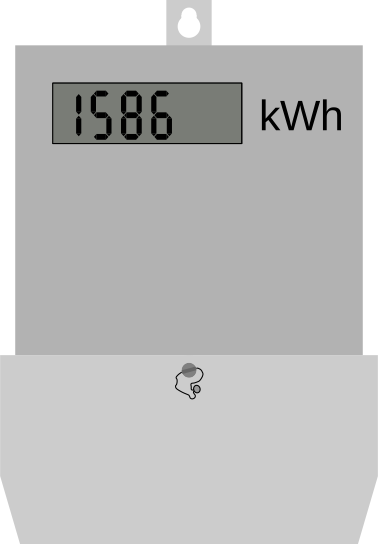
Digital meters often rotate through several screens. One may show cumulative imported energy, while others show voltage, current, date, export energy, tariff registers, or diagnostic codes.
Wait for the relevant energy register and check its label. Copy leading zeroes if they help you verify the digit count, although they do not change the numerical value. Treat decimal digits consistently: a differently coloured final digit or digits after a decimal point may represent tenths or hundredths, but the display convention depends on the meter.
If you cannot identify the correct register from the faceplate or bill, consult the provider's meter instructions. Guessing between “Import” and “Export” can reverse the meaning for a solar installation.
Reading a mechanical dial meter
Mechanical dial meters require more care because neighbouring dials normally rotate in opposite directions.
- Read dials from left to right.
- When a pointer sits between two numbers, record the lower number it has passed.
- When a pointer appears exactly on a number, check the dial to its right. If the right-hand dial has not passed zero, use the previous number on the current dial.
- Ignore a test dial or fractional dial unless the provider's instructions explicitly include it.
Photographing the visible face for your own verification can help, but the typed reading should still be reviewed before it becomes part of your history.
A worked recording example
Suppose your previous valid entry was 48,216 kWh on September 1. On September 8 the cumulative display reads 48,279 kWh.
The new reading is 48,279. The interval consumption is:
48,279 − 48,216 = 63 kWh
Record the new cumulative value and its actual date. Do not enter “63” as the new meter reading: 63 is the consumption between readings, not the cumulative register.
The four checks that catch most errors
1. Is this the correct meter?
Match the location, meter label, serial number, or your own meter name. This matters when a building has several similar boxes.
2. Is the new value lower?
A normal cumulative reading should not fall. A lower value may mean a typo, wrong meter, rollover, meter replacement, changed multiplier, or a different register. Investigate rather than forcing it into the history.
3. Is the increase plausible for the time elapsed?
An increase of 100 units over 30 days and the same increase overnight describe very different situations. Always evaluate the reading with its timestamp.
4. Did you preserve the original observation?
Avoid “correcting” a reading to match an expected bill. Save what the meter showed, then document any provider adjustment separately.
A repeatable MeterPilot workflow
In MeterPilot, select the property first, open Add readings, and update each meter from its displayed last value. That starting value reduces retyping and gives you an immediate visual check. Review the calculated change before saving. If a value is lower or unexpectedly large, stop and verify the physical meter.
The goal is not to read the meter constantly. A consistent weekly reading, plus one near the official billing date, is usually more useful than irregular bursts of data.
Frequently asked questions
Should I include digits after the decimal point?
Use the same precision every time and follow the provider's display convention. Mixing whole-unit and decimal readings can create apparent jumps ten times larger or smaller than reality.
What if the display changes before I finish?
Wait for the same labelled register to return. Do not combine digits from two screens.
Is the meter reading the same as the bill's consumption?
No. The reading is cumulative. Consumption is normally the difference between two valid readings, sometimes adjusted by a multiplier or provider rules.
What if my bill says “estimated”?
Keep your dated observation. It can help you compare the provider's estimate with the physical meter, but only the provider can correct the official bill.
Authoritative reading references
Meter interfaces vary, so provider instructions take priority for register codes. For common digital, mechanical and dial patterns, Citizens Advice explains how to read gas and electricity meters. The important transferable rule is to preserve the meter identity, requested register, unit and real observation time together.


Turn one observation into a trustworthy history.
MeterPilot keeps the previous value, timestamp and meter identity together so the next comparison has a reliable starting point.
See the MeterPilot workflow